
- The best way to reduce typos and grammar mistakes—you need an English proofreader
- Aside from misspelled words and misplaced commas, where do our mistakes come from?
- Without a style guide, it’s much harder to be consistent
- Another source of mistakes—guessing at grammar rules (another reason you need an English proofreader)
- In my experience, most mistakes actually come from editing and revisions
- You’re greatest friend when it comes to proofreading—time
- If you do make a mistake, don’t beat yourself up too much (but maybe you need an English proofreader)
- My top 3 tips for proofreading
- What did I miss? More importantly—what did you miss?
Are you like me? Probably not. You’re not secretly an English copywriter or proofreader, right? Didn’t think so. But if you are, welcome! You may not need an English proofreader.
But even if you aren’t an English proofreader, you write stuff. I don’t mean books and academic articles. But you write reports, fill out forms, and send texts, right? I’m guessing this is where we differ. What do you do when you make a typo when chatting with someone? Nothing, right?
Not me. I go back and edit my message (when possible). At the very least, I’ll type a correction.
How’s it gong?
*going
I can’t help it. It drives me nuts. Even when I know people understood my message.
But I usually give people a pass on social media. With personal social media posts, it’s not a big deal. But writing on behalf of your business or brand? You need to take the the time to get stuff right. You need an English proofreader.
In other forms of written communication, I can’t stand seeing simple typos. Why? You can get rid of most of them with a little effort.
The best way to reduce typos and grammar mistakes—you need an English proofreader
There are a variety of free tools you can use, which I’ve covered before. Turn on spell check in your browser. Install the Grammarly (affiliate link) extension for your browser. Now. Do it. I mean it.
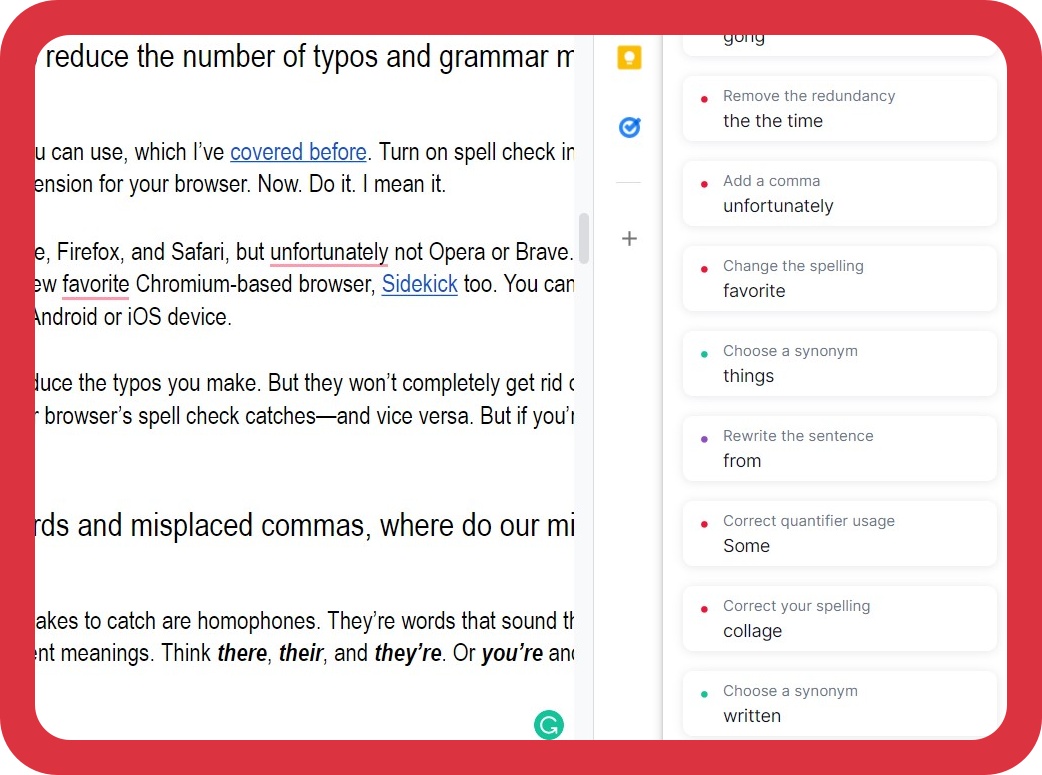
Grammarly supports Chrome, Edge, Firefox, and Safari, but unfortunately, not Opera or Brave. FYI, Grammarly works just fine in my new favorite Chromium-based browser, Sidekick (affiliate link). You can even install the Grammarly keyboard on your Android or iOS device.
Grammarly and spell check will reduce the typos you make. But they won’t completely get rid of them. Grammarly misses things your browser’s spell check catches—and vice versa. But if you’re careful, you’ll notice stuff they both miss.
Aside from misspelled words and misplaced commas, where do our mistakes come from?
One of the most challenging mistakes to catch is homophones. They’re words that sound the same, are spelled differently, and have different meanings. Think there, their, and they’re. Or you’re and your. And don’t forget to, two, and too.
In my Sept. 26 post, despite using all the tips in this current post, a typo snuck through. A follower kindly pointed it out. I’d written “pour over” instead of “pore over.” How did it sneak through?

- I didn’t catch it proofreading manually.
- I finished the post less than 24 hours before I posted it.
- Grammarly didn’t catch it.
- The Google Docs spellchecker didn’t catch it.
- I didn’t catch it having it read aloud to me.
That’s why proofreading is so tough. It’s so easy for mistakes to sneak through.
Without a style guide, it’s much harder to be consistent
In collage, you likely had to write quotes in a specific format, like APA or MLA. There were specific rules about the way things should be written. For example, do you use the Oxford comma regularly, sometimes, or maybe you don’t know. FYI, the Oxford (or serial) comma is the comma you put after “and” in a list of three or more things.
That’s the problem with English grammar and even spelling—it’s not 100% set in stone. As a Canadian, I grew up writing “colour,” but I started spelling it “color” in university. Early spell checkers were all based on American spelling. Most of the materials I used in Korea were based on American English. Spelling words with Canadian spellings only confused my students. I adopted American spellings for my students’ sake.

Now, one of my clients is based in America, and the other is in Australia. I have to be very aware of which content I’m working on and remember to follow the rules for the correct language. That means using the Oxford comma for the American client but not the Australian one. I have to be aware of my spelling for each client as well.
But I’m very consciously aware of watching out for these things, so I rarely make these mistakes. I’m actually more likely to use both British and American spelling in one of my blog posts. I tend to default to American spelling. But I sometimes slip back into my Canadian spelling habits.
If you haven’t decided to use (or not use) the Oxford comma, it’s much easier for you to use it inconsistently.
Another source of mistakes—guessing at grammar rules (another reason you need an English proofreader)
When you’re not sure and are pressed for time, you can’t be bothered to check—so you guess. Which is correct?
Sign up
Signup
Sign-up
Two of them are correct, but they’re used in different ways. Signup is always wrong. Sign up is a phrasal verb (Users must sign up to access the content). Sign-up is used as an adjective. (Put your name on the sign-up list). But when you’re not sure, you guess.
Sometimes you’re right, but often you’re wrong. FYI, that rule for hyphenation usually holds true, but they’re are exceptions. If the phrase comes before the verb, it’s hyphenated, but if it comes afterwards, it isn’t. BTW, Grammarly doesn’t seem to understand this distinction.
Put your name on the sign-up list.
The list contains all the sign ups.

In my experience, most mistakes actually come from editing and revisions
Yes, sometimes typos come from typing to fast. You meant to type “watched,” but you typed “watches.” Grammarly may or may not catch it. You’d likely notice it if you read your text aloud, but sometimes, we’re pressed for time and skip that step.
But more often than not, mistakes and typos come from editing. When you go back and change something you’ve written, you change one part, but you don’t change the whole sentence. You change the verb tense in the first clause, but you don’t change tense in the second clause. Or you change from a singular subject to a plural one and forget to change the verb forms.
You’re greatest friend when it comes to proofreading—time
The more time between proofreading passes, the more likely you’ll find mistakes. The problem is we’re usually pressed for time. We barely have enough time to proofread. Who has the luxury of putting the text aside for 2–3 days and coming back to it?

But you’ll be doing yourself a favour if you can. I routinely find errors in previous blog posts when I glance at them again. It’s why readers spot errors in my writing that I miss. I’m too close to it. They’re seeing it with fresh eyes.
In my last post, I mentioned a unique proofreading job where I had to be able to read and understand Korean. This job went on for several months. Every time the client contacted me with a new document to proofread, I always told them I needed two days.
The documents weren’t long—usually less than ten pages of dialogues and lists. The time to proofread one of these files was less than two hours. But I still told them I needed two days. On Day 1, I’d make the major edits and then proofread the file. I’d then put it aside for a day and come back to it the next. I always found more mistakes. If I’d rushed through it in two hours and sent it back, it wouldn’t have been my best work.
Last week, I spotted a mistake in an email I’d written for a client. I’d proofread it, other members of my team had checked it. But after a day or two, looking at it again, I realized I’d left the “e” out of arrangement (arrangment). For whatever reason, my spell checker didn’t pick up on it. Not sure how I missed it, but I’m glad I caught it before the email got sent.

If you do make a mistake, don’t beat yourself up too much (but maybe you need an English proofreader)
Proofreading is tough, even in your native language. It’s a skill that needs to be developed and practiced. It’s why “proofreader” exists as a job. But even proofreaders will miss things. A good proofreader won’t miss much, but no one’s perfect.
If you read one of my earlier posts, you’ll remember how the human brain is wired to fill-in-the-blanks and make sense of things. This makes it very difficult to spot mistakes. One blog I read about proofreading referenced this video to make a point about attention. Give it a try yourself. Follow the on screen instructions.
If you’ve seen that video, check this one out.
Even when you know what you’re looking for, you can miss things! That’s why it’s helpful to do several passes of a text, looking for different things each time. Do one pass for spelling. Another time, make sure hyphenated words are used correctly. Do another pass looking for punctuation errors. Try to do it all at the same time, and you’re more likely to miss something.
My top 3 tips for proofreading
1. Use another proofreader (yes, you need an English proofreader)
If you can’t pay someone (like myself) to proofread your website, emails, or blogs, try to get someone else to proofread your writing. If you work in an office, you could arrange with another co-worker to proofread each other’s writing. I guarantee you’ll catch mistakes in each other’s writing.
If any proofreaders are reading this and are interested in a similar arrangement, let me know. The biggest problem I anticipate is that I operate on a tight schedule. If I ever get to the point that I can get a week or two ahead with my blog writing (ha!), it would be much easier to work out such a deal.
2. Use Search and Replace
Earlier I suggested taking several passes at your text. Use “search and replace” to be more effective. When you’re doing a pass for hyphenated words, search for all the hyphens in your text. It’ll be much easier to find each one and decide whether it’s been used correctly or not. You can also search for the first word in a hyphenated pair to see if you’ve used it correctly. Another trick I always use is to search for extra spaces. They can be heard to spot…until you hit publish. Ctrl + F and then hit the spacebar twice. You’re welcome.
3. Use a text expander for hard-to-spell words and often-used phrases
Text expanders are great for often-used phrases. Try using them for hard-to-spell words, words that aren’t in the dictionary (no need to customize several dictionaries), and phrases you use regularly.
4. Read Aloud—use an extension
One well-known tip for proofreading is to read your text out loud. But I find it’s very easy for “auto-pilot” to take over and for you to start skipping stuff and reading what you want to read. So I use an app called Read Aloud.
I duplicate the tab I’m working on, run Read Aloud on one tab, and read along and edit on the other tab. If you use Word, under the Review tab, there’s also a function called Read Aloud. You’ll be amazed at what you catch when listening to you’re text read back to you.
Bonus Tip: When using Reading Aloud, I bump up the speed. Not to a crazy speed, but when it’s faster, I not only get through the text quicker, I find I have to focus more.
What did I miss? More importantly—what did you miss?
Did I miss one of your favorite proofreading tips? I always love to learn more tips that make me a more effective proofreader! Which of my tips do you think you could use? Let me know in the comments!
If you’re a freelance proofreader keen on a proofreading partnership—hit me up. Let’s see if we can work something out!

But now the big question—how’d you do? How many mistakes did you catch? Including one in this paragraph, I included 17 intentional typos/errors in this post. “How’s it gong?” and “arrangement” don’t count.Think you caught them all or found an unintentional typo? Send me a message, and I’ll share a document with you highlighting my intentional errors. FWIW, neither Grammarly nor the Google Docs spellchecker flagged them all. 😉 Yet more evidence we all need an English proofreader.
BTW, once you noticed the first couple of mistakes, did your focus shift? Did you find yourself getting distracted? Were you more focused on looking for additional errors? Cause that’s what happens to me!
Subscribe to this blog or follow me on Instagram, Threads, Facebook, LinkedIn, or Twitter for more content and updates.